Set or change a player's handicap or tee box assignment for an Event

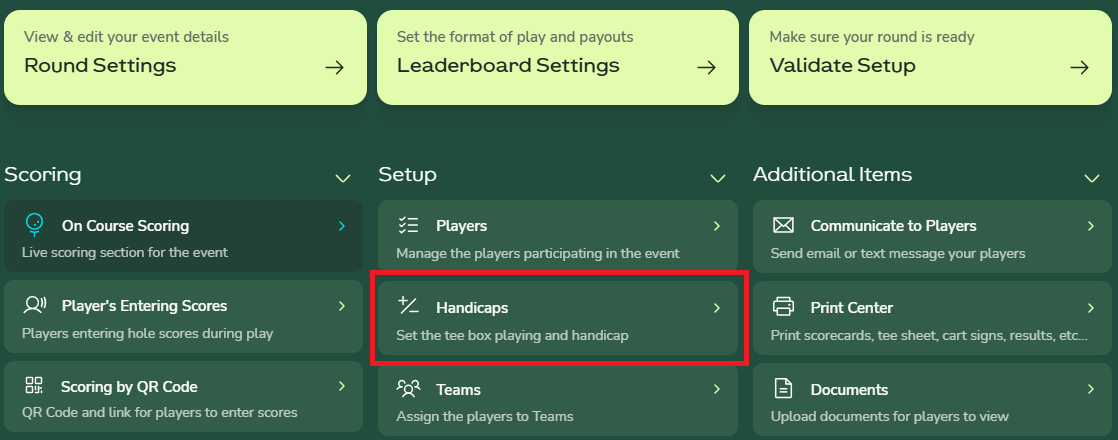
From the Advanced Event Home, select the “Handicaps” button to open the page where player handicaps and tee box assignments can be manually set or modified.
Update Handicap
Updating a player’s Course Handicap or Playing Handicap will save the entered value directly. Entering a Handicap Index will automatically recalculate the player’s Course Handicap and Playing Handicap using the assigned tee box and the event’s handicap allocation percentage.
Update Tee Box
Changing the player's Tee Box assignment will recalcuate their course and playing handicap using the handicap index entered for the player, if the player does not have a handicap index then no changes will be applied to the player's course and playing handicap.
Locked Handicap
When a player’s handicap is locked, it prevents both manual and system updates to that handicap. To modify the value, click the lock icon to unlock the player’s handicap.

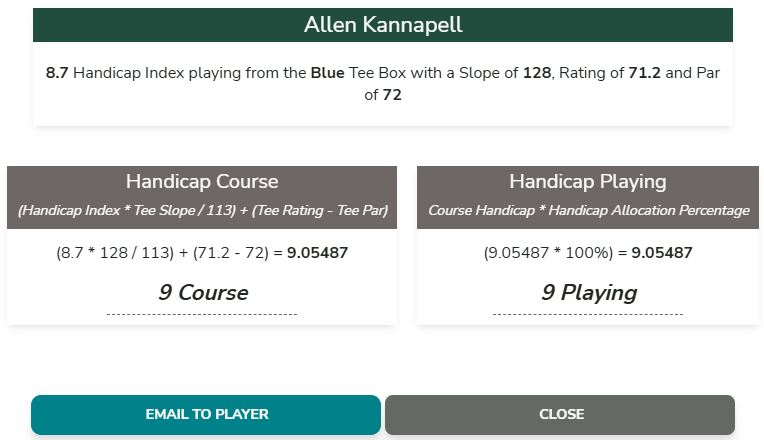
Handicap Explanation
Clicking the “i” icon next to each player provides a detailed explanation of how the player’s handicap was calculated based on the World Handicap System rules and the event settings.