Combine rounds for 6/6/6 (Triple 6) or 9/9 format changes events

Overview
In multi-round events, Unknown Golf allows you to combine rounds to create a seamless 18 hole scoring experience for your players. This feature is useful for tournaments that switch between a Team Score Only Format (Scramble / Alternate Shot) and Team by Player Score format (Team Best Ball).
When you combine round together, there will be a single Tee Sheet.
Steps to Combine Rounds
- Navigate to the Overall Event Home where all of the rounds are listed
- For each of the Rounds
- Click on the round name to access the Round Home
- Click on the Round Settings button at the top of the round home
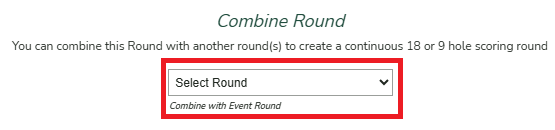
- Scroll down to the Combine Round section and select the First Round listed that is part off the combined round
Ensure to select the first round listed even if the round select is the same as the round you are performing the section for. The selection is identifying the Anchor Round that all other rounds will be combined with.
Common Use of this feature
This feaure is used the most for the 6/6/6 event format where the scoring is by team and changes every six holes.