Setting up weekly league by team that include individual (singles) match play

Many multi-week leagues use a team format where, each round, teams compete against another team in both team and individual match play to earn points.
Event Setup
Follow these steps to complete the league setup:
- Create a Multi-Round Event
A new multi-round event includes one round by default. Do not add additional rounds yet. - Configure the overall event
Set up the Settings and Leaderboards for the overall event, please reference below on how the Overall Event Leaderboards should be configured. - Configure the first round
Set up the Settings and Leaderboards for the first round (week) of the event.Settings and leaderboards configured for the first round are automatically applied to any additional rounds added. Be sure to complete this configuration before adding more rounds. - Add remaining rounds
Add rounds for the remaining weeks. All settings and leaderboards from the first round will automatically copy to each new round, so no additional configuration is needed. - Add players and create teams
Add players to the overall event, verify handicap information, and create the teams. - Create flights
Multi-round events require at least one flight for each overall leaderboard.Tip: You can simply auto-assign all teams to a single flight. - Create team matches
From the overall event homepage, open the Match Play page and run the Round Robin Auto-Assignment to generate the weekly team matches.Individual matches will be created within each round after weekly substitutes are finalized.
Weekly Round Setup
Complete the following steps each week:
- Confirm course side (9-hole events only)
Verify the correct front or back nine is selected in Round Settings. - Set substitutes
If a player is absent, assign a substitute by going to players section from the round home. If no substitute exists and the match should be played against par:- Add an Event-Only player
- Assign them as the substitute
- Enter par scores for the round
Help article with more information on Substitute a player for a multi round event - Create individual matches
Run the auto-assignment for Individual (singles) matches to create A vs. A and B vs. B pairings.Help article on auto assigning the individual matches Auto create singles matches from team match assignment - Set tee time pairings
When setting the tee time pairings, remember it is a two step process, first step is to create the tee times and the second step is to auto assign the players to the tee times by Match.Help article with more information on Tee Time Pairings Overview - Prepare and communicate
- Print scorecards
- Send player communication emails with round details
Help article for printing Scorecards Print Scorecards and to send emails to your players Communication to players via Email and Text Messages
Overall Event Leaderboard Configuration
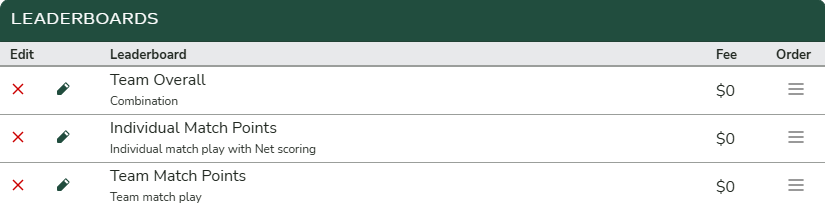
To display standings that include both Team Match Points and Individual Match Points each week, you must create three leaderboards:
- Match Play (Create Matches) — configured by Individual
- Match Play (Create Matches) — configured by Team
- Combination — configured by Team
- Add the leaderboards created in steps 1 and 2
- Since standings are based on points, under Results set Order by Score to Descending (Higher Scores Win)
Round Leaderboard Configuration
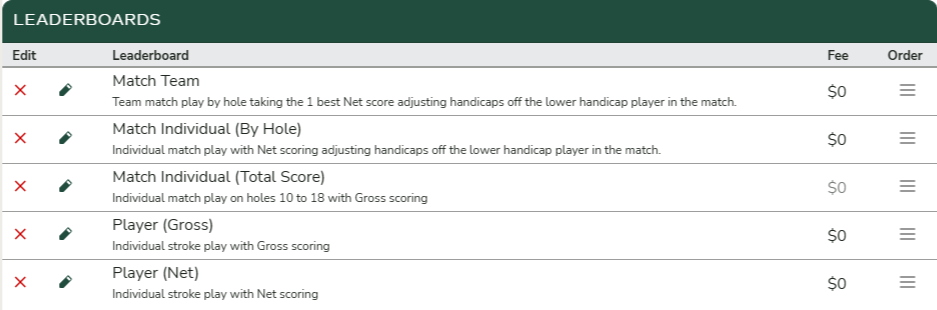
To calculate match points each week, you must create a Match Play (Create Matches) leaderboard configured by Team. This is required even if no points are awarded for team matches, as the team matches must exist so the individual match auto-assignment can determine which players compete against each other.
After the Team Match Play leaderboard is created, you can add as many Individual Match Play leaderboards as needed to calculate points by hole, total score, or both.