Auto Update All Players’ Assigned Tee Box

Overview
When managing large events or adjusting tee assignments, you can automatically update the tee box for all players at once. This saves time compared to editing each player individually.
Steps to Auto Update All Players’ Tee Box
- Open Event Setup
- From your dashboard, select the event you want to edit.
- Go to Handicaps
- In the event menu, click Handicaps to view the player's handicap information, which includes tee box designation.
- Auto Assign Player Tee
- At the top of the Handicap menu, click Auto Assign Player Tee
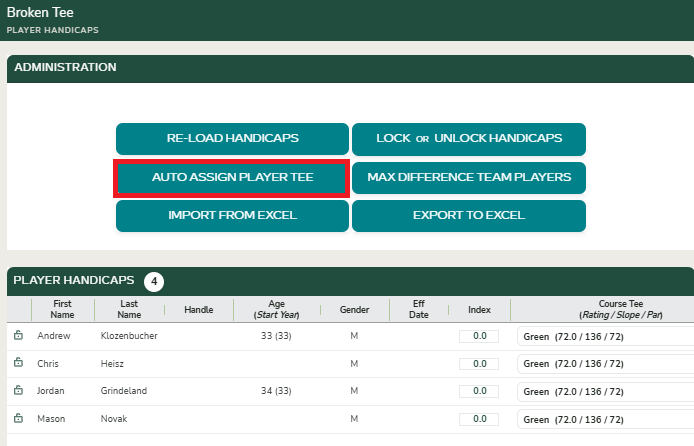
- Select the Tee Box
- Choose the desired tee box from the list of available options from the host course.
- You can break down auto assignments by flight, should you need.
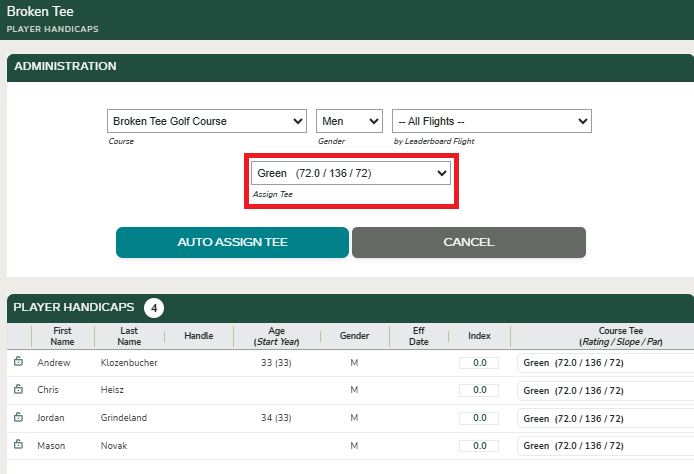
- Apply the Update
- Confirm to Auto Assign Tee.
- All applicable player tee assignments will automatically update to the selected tee box.