Set a tiebreaker for a leaderboard

Overview
Unknown Golf allows you to define tiebreaker methods for your event leaderboards. These settings determine how ties are resolved—whether by a subset of hole scores, or other criteria—so results are displayed automatically and accurately.
Steps to Access Tiebreaker Methods
- Go to Leaderboard Settings
- In the event menu, click Leaderboard Settings.
- Select the leaderboard where you want to view or update tiebreaker settings.
- Locate Tiebreaker Methods
- Scroll to the Results section within the leaderboard setup.
- Review the available tiebreaker options.
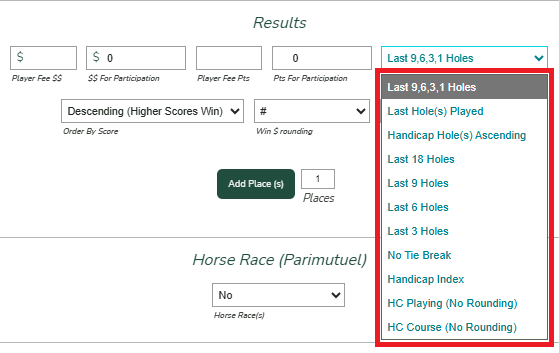
- Select Your Preferred Tiebreaker
- Choose from the list of methods (e.g., Last Hole(s) Played, Handicap Hole(s) Ascending, etc.).
- Add Places to your leaderboard
- Select 'Yes' when prompted to Break Ties.
- Save your selection.
The USGA's recommended Tie Break method is to utilize the last 18,9,6,3,1 for a multi-round event and the last 9,6,3,1 for a single round event.