Load Club (or Community) players from world handicap roster

If your club is established with a World Handicap provider (USGA or Golf Canada), your membership can be automatically loaded from your World Handicap roster into your club or community.
Once configured, this automatic process runs nightly and will add any new players from your World Handicap roster to your club or community in Unknown Golf.
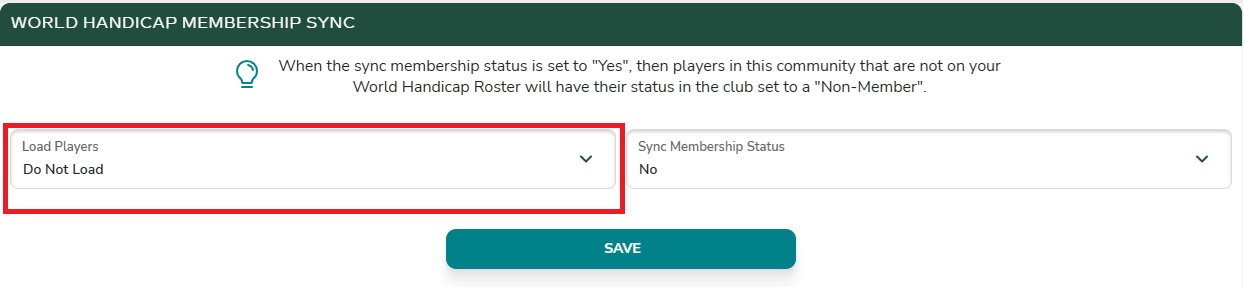
Load Players
These settings are unique to each community, so if you want your membership loaded into multiple communities within your club, you will need to configure the settings in each community individually.
From your Club or Community home page, open the menu in the top-left corner and navigate to Admin Settings → Settings.
Scroll down to the World Handicap Membership Sync section. Here, you can choose whether to load Men Only, Women Only, or All Players from your World Handicap roster into your club or community.
Sync Player Member Status
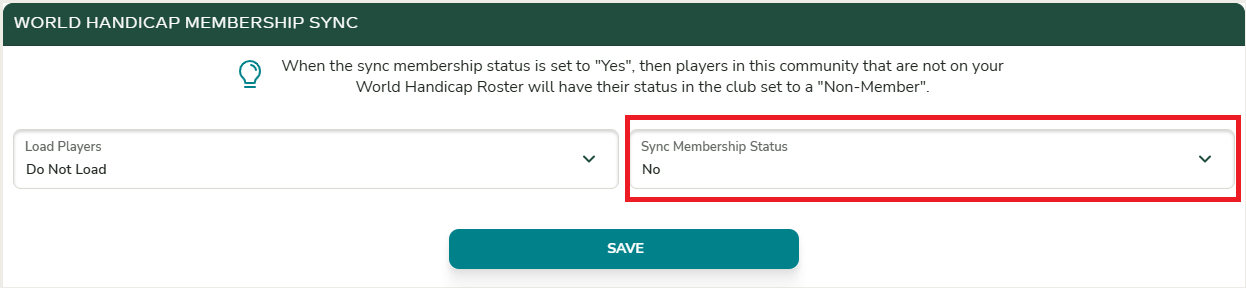
If you want your players’ membership status to stay in sync with your World Handicap roster, you can enable the status sync option.
When enabled, each evening Unknown Golf will update player statuses as follows:
- Players who are not on your World Handicap roster will have their status changed to Non-Member in Unknown Golf.
- Players who are on your World Handicap roster will have their status set to Member in Unknown Golf.
Does Unknown Golf apply changes to my world handicap roster?
No. Unknown Golf only retrieves players from your World Handicap roster. Any changes you make to players within Unknown Golf apply only inside the platform—no updates are sent back to your World Handicap roster.
Is World Handicap Load Available?
Before you can use the features described above, your club must first be set up by Unknown Golf Support to integrate with the World Handicap System.
To have your club configured, please contact Support@UnknownGolf.com and provide your World Handicap Club ID.
