How to Score a Rain-Shortened Event (Shotgun Start)

Overview
Weather doesn’t always cooperate with golf tournaments. If your event is shortened due to rain (or other conditions), Unknown Golf allows you to record scores based on the number of holes actually played. This ensures fairness and accuracy when a full round cannot be completed.
Steps to Score a Rain-Shortened Event
- Go to Event Setup
- Open the event you need to update.
- If multi-round, select the applicable Round Settings.
- Verify Number of Holes Played
- Determine how many holes were completed by the field (e.g., 11 holes instead of 18).
- Adjust Leaderboard Settings
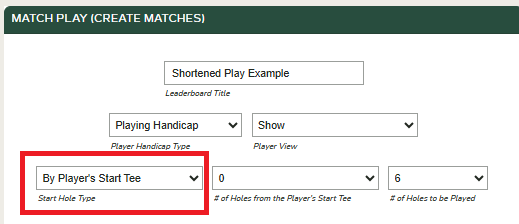
- In Leaderboard Settings, locate the option for Start Hole Type.
- Update to 'By Player's Start Tee' and select # of Holes to be Played.
- Save Settings
- Once saved, all scoring and leaderboard calculations will update automatically based on the reduced number of holes.
- Review Leaderboards
- Confirm that totals, handicaps, and flights are displaying correctly under the shortened round.
Tips
- Communicate with players that results are official over the reduced number of holes.
- You can communicate with all event players within admin setup to explain the rain-shortened scoring method.
- For fairness, ensure all players/teams in the round are scored on the same number of completed holes.