How to Upgrade to Unknown Golf +

Overview
Upgrading to Unknown Golf+ unlocks advanced features, enhanced event management tools, and exclusive member benefits. The process to upgrade is quick and can be completed directly within your account.
Steps to Upgrade
- Log In to Your Unknown Golf Account
- Go to UnknownGolf.com and sign in with your existing credentials.
- Access Your Account Settings
- Click your profile icon in the top-right corner.
- Select Settings, then Membership on the left menu.
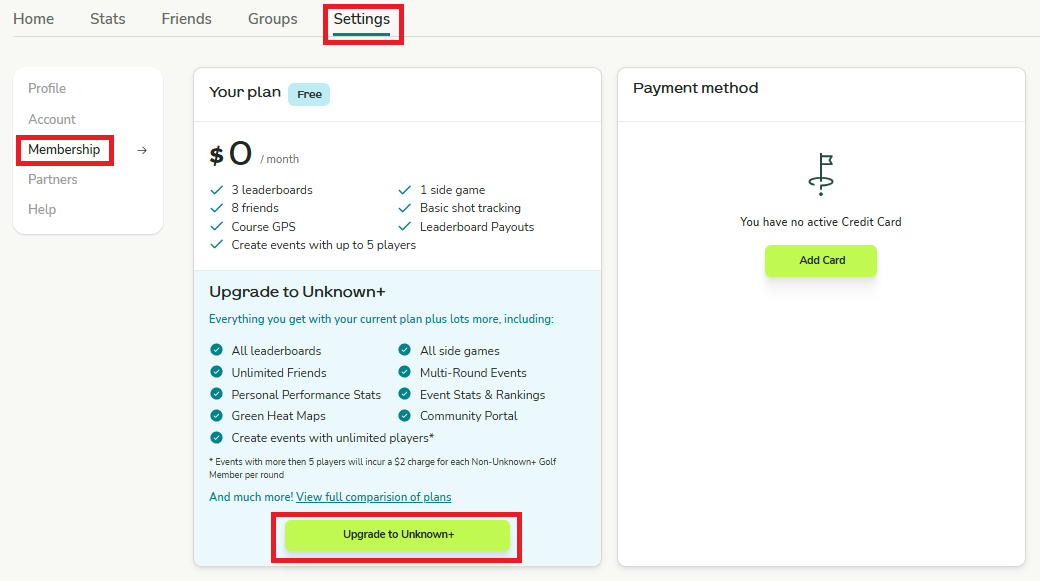
- Choose Upgrade Option
- Look for the Unknown Golf+ upgrade section.
- Click Upgrade to Golf+.
- Select Your Plan
- Choose between available subscription terms (e.g., monthly or annual).
- Review included benefits before confirming.
- Enter Payment Information
- Complete payment details and confirm your subscription upgrade.
- Enjoy Your New Features
- Once upgraded, you’ll immediately have access to all Golf+ benefits.